
Frequently Asked Questions
Here’s some of the most common questions we get asked about our products.
ioSafe - Frequently Asked Questions
- Network Attached Storage (ioSafe 1522+, 1520+, 1019+, 1515+, 1517, 218, 216, 214, 213)
- How do I accomplish certain functions using Synology’s OS?
- Every ioSafe NAS device comes with Synology DiskStation Manager (DSM) to allow you to administrate your NAS device over the web. You can learn how to use the various functions and features of DSM by consulting Synology's DSM knowledgebase, which includes help articles as well as video tutorials.
- General Questions for NAS
- How do I update Synology DiskStation Manager (DSM) on my ioSafe NAS?
- Please read this Knowledgebase article on Synology’s website to learn how to update DSM.
- How to change the display language for my ioSafe NAS’s web management UI?
- Please read this Knowledgebase article on Synology’s website to learn how to change the language for your ioSafe NAS.
- What’s the default password of admin on the ioSafe NAS?
- If you choose the one-click setup option during DSM installation, or reset the administrator password after installation, you can login the web management UI as “admin” without entering any password. After login, you can enter the password you wish to use for the admin account on the “Control Panel » User” page of the web management UI.
- How can I reinstall DiskStation Manager on my ioSafe NAS?
Users can reinstall DiskStation Manager on their ioSafe NAS by pressing the RESET button twice. This button is a small button usually located on the rear of your ioSafe NAS device. If you want to reinstall the ioSafe NAS with a new hard drive, please back up data on the old hard drive first before you reinstall the product.
- Prepare the DSM patch file, and the Synology Assistant installation file in the same version.
- Install Step 1 of Synology Assistant.
- Refer to the description of reinstalling the Synology server in the User’s Guide. Press the RESET button on the back panel correctly. Note: If you replaced the internal hard drive with a new one before start, please ignore this step.
- Run Step 2 of Synology Assistant to reconfigure the ioSafe NAS.
- How do I reboot the ioSafe NAS?
You can choose either one of the following steps to reboot your ioSafe NAS:
- Go to the Options menu in the top right of the web management UI and choose Restart. Click Yes and the system will reboot the ioSafe NAS automatically.
- Press the Power button on the front panel and hold it until you hear a beep sound. After the ioSafe NAS is shutdown, repeat the action again to start the ioSafe NAS.
- What is the username and default password for accessing my ioSafe NAS via Telnet/SSH?
The login account name is: root
The password is the same as that of the admin. You cannot leave the password field blank.
Note: You should always set a secure password for your ioSafe NAS instead of using the defaults.
- What should I do if I cannot access the ioSafe NAS as a domain user even with the correct password?
Please follow the steps below to fix this problem:
- Make sure all settings of the user account in the domain controller are correct.
- Synchronize the time of the ioSafe NAS with that of the domain controller.
- If you are accessing the ioSafe NAS via Samba connection, try to reconnect by using the IP address of the ioSafe NAS instead of the NetBIOS name of the ioSafe NAS.
- Try to access the server by using both domain usernames. For example, domain_NetBIOS_name\\user_name, and domain_FQDN_name\\user_name
If you still cannot access your ioSafe NAS, please submit a Support Ticket.
- Will online users be affected when I am upgrading the DSM?
Yes. When upgrading the DSM, all services will be stopped and all users will be logged off until the upgrade is finished. Upgrading the DSM should only take about 10 to 20 minutes.
- Does the ioSafe NAS support Wi-Fi?
For current ioSafe NAS's, the answer is no. We do not include wireless network adapters in ioSafe hardware. ioSafe NAS's also run Synology DSM 7, which does not support external USB devices and their drivers, including Wi-Fi dongles.
If you are running an older ioSafe NAS with Synology 6.1 or older, then yes, you can connect to wi-fi with a third-party wireless network adapter. To set up a wireless connection on your ioSafe NAS device, please follow the steps below:
- Plug in a wireless dongle to the ioSafe NAS for wireless network.
- Login to the web management UI with an admin account.
- Go to Main Menu » Control Panel » Network » Wireless Network.
- Click on the Set up a wireless network button.
- Follow the wizard to configure your settings.
- How do I copy files along with their domain ACL privilege settings from a Windows server to the ioSafe NAS?
- To migrate/copy files and folders along with their ACL privilege settings from a Windows server to your Synology NAS, please follow the steps located in this article in the Synology DiskStation Manager Knowledgebase.
- Can I backup both my Mac and PC to my ioSafe device?
Yes, you can backup data from any Windows or macOS computer to any of our NAS products, as well as to our direct-attach storage products like the Solo, SoloPRO, or Solo Hawk.
You can use one NAS device for each of the computers on your network, provided you have enough storage capacity.
For any of the direct-attach storage products, the most effective way is to have one product for each computer. Although it can be done with one unit, there are some restrictions and the most effective configuration will vary between users. Please contact Support for more information.
- I’m trying to register and need a DRS serial number and Activation code. Where do I get those?
- Your device comes standard with a two (2) year Data Recovery Service. If you purchased a five (5) year upgrade, additional information with both a DRS serial number and activation code should have been included in the box with your unit. If this information was lost or cannot be found, please contact Customer Support.
- Can I leave my ioSafe device on 24/7?
- Yes. Your ioSafe device is designed to run 24/7 and does not need to be powered down between uses.
- How do you handle recovery of data subject to compliance such as HIPAA, SOX, FERPA, GLBA, or NIST 800.34?
If the data volume that is subject to regulatory compliance while being stored on ioSafe devices is encrypted by software, then there is no security risk in ioSafe recovering the software encrypted volume and returning the volume back to the customer intact as long as ioSafe in not given the encryption keys to the volume. ioSafe does not need the software encryption keys to recover the encrypted volume of data.
If the volume is not encrypted and/or ioSafe cannot recover the encrypted volume with our internal recovery tools, we can contract with our forensic recovery partner, DriveSavers, which undergoes an SOC 2 Type II audit every year and also offers High Security and Forensics services for entities that require them. The data drives can also be sent directly to DriveSavers if security reasons require it.
- How do I reset my username and password?
- Locate the RESET button on your ioSafe device. To find the location of the RESET button on your device, please refer to your device's Product Manual.
- Use a paper clip to gently press and hold the RESET button until you hear a beep, and then release the button immediately. The device and password are now reset.
- Enter find.synology.com in the address bar of your web browser and find your ioSafe device on the Web Assistant page or find your ioSafe device through the Synology Assistant desktop utility.
- Double click on your ioSafe device. Enter the system’s default username, which is admin, and leave the password field blank.
- Click Sign In. Continue through the proceeding steps to finish resetting your password for your administrator account.
If you are still unable to reset your administrator password, please contact ioSafe Technical Support for further assistance.
- Multimedia Questions for NAS
- Can I use my ioSafe NAS device as a media server?
- Yes. There are multiple media server applications available in the Package Center that you can install, including Synology Media Server, Synology Audio Station, Plex, Logitech Media Server, MinimServer, and iTunes Server.
- Why do images appear in low resolution on DLNA players?
- If images larger than 4096*4096 do not appear in their original size on your DLNA player, please visit this article on the Synology DiskStation Manager Knowledgebase for instructions on how to fix the issue.
- Why can’t I see the files I just added on Photo Station, Audio Station or iTunes Server?
You will not find multimedia files on Photo Station, Audio Station or iTunes Server when the files are still being indexed. They will appear once the indexing process completes.
To see which files are still being indexed, please visit this article on the Synology DiskStation Manager Knowledgebase for instructions.
- Printer Questions for NAS
- Can I use a USB printer through my ioSafe NAS?
Yes. You can use the Synology Assistant software to set up a USB printer with Windows or Mac.
- Download Synology Assistant from the Synology Download Center. Select your ioSafe NAS product from the drop-down menu, then click on the Desktop Utilities tab to find the download.
- Install Synology Assistant.
- Follow the directions in this article from the Synology Assistant Knowledgebase.
If you’re using Windows, you can also set up a printer share on Windows by following the instructions located in this article from the Synology DiskStation Manager Knowledgebase.
You can use a PostScript USB printer running off your ioSafe NAS device with your Mac by following these instructions.
- Can I scan and fax with an all-in-one printer shared by the ioSafe NAS?
Yes, but multi-function printers are shareable only for Windows users. If your multi-function printer is connected to the USB port of the ioSafe NAS you can set up your ioSafe NAS as the print server over the local area network, allowing client computers to print, fax, or scan with the printer.
For more information on how to set up a multi-function printer, please refer to this article from the Synology DiskStation Manager Knowledgebase.
- How many USB Printers does the ioSafe NAS support at a time?
- ioSafe NAS devices support up to two printers.
- How do I setup the PostScript USB printer on the ioSafe NAS with Macs?
- You can use a PostScript USB printer running off your ioSafe NAS device with your Mac by following these instructions.
- Software Questions for NAS
- Can I use my ioSafe NAS as a mail server?
Yes. You can turn your ioSafe NAS into a mail server, allowing DSM users to receive and deliver mail messages with the webmail service or mail client programs.
To set up a mail server:
- Log in to your ioSafe NAS as admin or a user belonging to the administrators group.
- Go to Package Center from your NAS desktop to install Mail Server and enable the service.
For more detailed information on how to set up mail server, please refer to the help article for Mail Server on Synology’s Support website.
- Can I limit the bandwidth of the Download Station?
- Yes. Open the Main Menu from the web management UI and select Download Station. You can set up the maximum upload & download rates in Download Station’s Settings section.
- Can I access my ioSafe NAS device with my Windows Active Directory Domain credentials?
- Yes. You must first join your ioSafe NAS to your Windows Active Directory Domain in order to use your credentials to log in. Please refer to Synology’s DiskStation Manager Knowledgebase for detailed instructions.
- Can I back up MySQL databases?
- Yes. You can download and install phpMyAdmin from the Package Center to back up MySQL databases by using its Export feature. Please refer to the phpMyAdmin documentation for more details.
- Can I host a website on my ioSafe NAS device?
- Yes. Please follow the instructions on Synology’s DiskStation Knowledgebase to set one up.
- Can I host multiple websites with different domain names on the ioSafe NAS?
- Yes, you can host multiple websites via the Web Station app’s Virtual Host functionality. An admin user can host up to 30 websites on one single ioSafe NAS server with different domain names or port numbers. To enable this function, please log in the ioSafe NAS’s web management UI and install the Web Station app from the Package Center to configure this service.
- Can I customize the error page for my website?
- Yes. Create a webpage with the content you prefer, name it as “missing.html”, and upload the file to the “web” shared folder.
- Can I install third party PHP applications on my ioSafe NAS?
- Yes. Please follow the instructions for your version of DiskStation Manager on Synology’s DiskStation Knowledgebase.
- What applications on ioSafe NAS devices support IPv6?
- Please refer to the list of applications that support IPv6 on Synology’s DiskStation Knowledgebase.
- Storage Questions for NAS
- Can I use external disks, including USB drives, with the ioSafe NAS?
- Yes. Please refer to this article from the Synology DiskStation Manager Knowledgebase for information on how to use them, which file systems the Synology OS recognizes, how to format them, perform a S.M.A.R.T. test, and set default permissions for all external devices.
- How do I know when the internal hard drive of the ioSafe NAS is full?
You can get the usage status of the internal hard drive either by configuring email, SMS, or push notifications in the web management UI.
To configure notifications, please refer to this article from the Synology DiskStation Manager Knowledgebase for instructions.
- Is it necessary to defragment the internal hard drive of the ioSafe NAS?
- No. Disk defragmenting is only required for FAT file systems. It is not necessary to defragment the internal hard drive of an ioSafe NAS device because it uses an ext-based file system.
- Can I expand the storage capacity with hard disk(s) of larger size?
- Yes. Please consult your ioSafe NAS device’s user documentation for specific instructions for your model, located on the Product Manuals page.
- What drives are qualified for the ioSafe NAS?
- You can find our qualified drive list here. Each drive has been qualified by ioSafe to work within the confines of our fireproof and waterproof drive housing. Other drives may work but are not guaranteed by ioSafe to operate within its operational temperature parameters, negatively impacting performance and reliability.
- Surveillance Questions for NAS
- Can I use my ioSafe NAS device as a security system?
- Yes. Surveillance Station is a professional Network Video Recording (NVR) package that allows you to effectively safeguard your home or office environment. You can download Surveillance Station from the Package Center on the web management UI.
- Desktop Storage (ioSafe Solo G3 and SoloPRO)
- What’s the best way to backup my data?
We suggest following the 3-2-1 Backup Rule. That is, your work should exist in three different places, on two different storage media, and at least one of those copies should be maintained on an ioSafe disaster-proof product or be kept offsite.
While RAID is an excellent part of any backup strategy, we do not recommend RAID as your only backup method. Many things besides drive failure can damage or erase your data:
- Corruption caused by unexpected disconnection during data access (e.g. a cable is unplugged during a data transfer, or the computer crashes or loses power while writing to the drives)
- Corruption or destruction caused by viruses or other malware
- Sabotage by a disgruntled employee or acquaintance
- Theft of your ioSafe device
- Natural disasters such as fire, flooding, etc. (unless you purchase an ioSafe disaster-proof device, of course)
Considering these possibilities, any single copy of your important data must always be considered at risk. That’s why backing up with the 3-2-1 backup rule is so important.
Plan accordingly and backup data to minimize downtime!
- Which operating systems are supported?
ioSafe products are fully supported with all current Microsoft Windows, Apple macOS, and Linux operating systems that can support the connection type used.
As of January 14, 2020, that includes Microsoft Windows 10 and 8.1, as well as macOS 10.13 “High Sierra” or newer.
- How do I get my product to work with my Mac?
To format a hard drive or SSD, use Disk Utility, which can be found in Applications → Utilities, or by selecting Spotlight Search (Command + Space) and typing in “Disk Utility” and hitting Return on your keyboard.
- Click on the drive in the window to the left.
- Click on the Erase button at the top.
- Enter a name for the new volume.
- Select the format type. Select APFS if you are using SSDs with your ioSafe product. Otherwise, select OS X Extended (Journaled). If you need to use your ioSafe product with both macOS and Windows computers, select ExFAT instead.
- For the scheme, select GUID Partition Map.
- Click Erase to start the process.
- Once the format is complete, click Done.

macOS Disk Utility, showing the "Erase" submenu.
- Can I backup both my Mac and PC to my ioSafe device?
Yes, you can backup data from any Windows or macOS computer to any of our NAS products, as well as to our direct-attach storage products like the Solo G3 or SoloPRO.
You can use one NAS device for each of the computers on your network, provided you have enough storage capacity.
For any of the direct-attach storage products, the most effective way is to have one product for each computer. Although it can be done with one unit, there are some restrictions and the most effective configuration will vary between users. Please contact Support for more information.
- I’m trying to register and need a DRS serial number and Activation code. Where do I get those?
- Your device comes standard with a two (2) year Data Recovery Service. If you purchased a five (5) year upgrade, additional information with both a DRS serial number and activation code should have been included in the box with your unit. If this information was lost or cannot be found, please contact Customer Support.
- Can I leave my ioSafe device on 24/7?
- Your ioSafe device is designed to run 24/7 and does not need to be powered down between uses.
- How do I power off my ioSafe device without risking loss of data?
Here are the instructions for safely removing your device from your computer:
Windows
Unmount the ioSafe device before powering it down. Left click the USB plug icon with the check mark on the Desktop task bar and select the ioSafe device from the menu that pops up. You may have to click on the Show Hidden Icons arrow on the task bar to find the correct icon. Windows will indicate when it is safe to disconnect the USB cable from the ioSafe device.
The USB Plug icon in the Windows 10 Desktop task bar.
macOS
Eject the ioSafe device before powering down the unit by dragging the ioSafe device’s icon to the Trash, or by selecting the ioSafe device’s icon and then pressing Command + E on your keyboard.- How do I connect my Solo-series device to a router?
- The ioSafe Solo G3, SoloPRO, and Solo Hawk are designed to be directly connected to a computer. While these devices may work with some routers, such connections are not officially supported, and we can offer no advice in relation to compatibility or configuration. If you need a network-attached storage device, we recommend the ioSafe 1019+ or the ioSafe 218, both of which perform reliably with all routers.
- Will a USB 3.0 cable connect to a USB 2.0 port?
Yes, USB 3.0 cables are generally backwards compatible with USB 2.0. However, your ioSafe device will be limited to USB 2.0 speeds. The lone exception are USB Type-C cables, which are USB 3.x cables that have a different form factor than the rectangular USB Type-A cables that most older USB drives use. USB Type-C cables are designed to be plugged in any orientation and can allow for faster data transfer speeds.
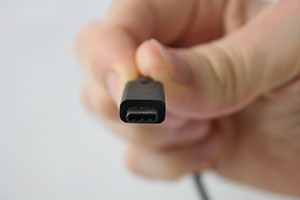
A USB Type-C cable connector
- What do you recommend for theft prevention?
- The Solo G3 can be bolted down or locked with a simple cable and padlock. The SoloPRO and Solo Hawk are equipped with a Kensington Security Slot.
- Does the HDD (Hard Disk Drive) spin down when not in use?
The Solo G3 has been designed to continually spin. Sometimes an operating system or backup program will time-out with an error if it must wait too long for the drive to spool up from sleep, resulting in no data being backed up.
The SoloPRO, when connected via the eSATA interface, may spin the HDD down if the operating system supports this functionality and is configured through its power management interface to do so. The fan in the SoloPRO will not spin down since it receives power directly from the SoloPRO’s power supply.
- What if there is a disaster after my Data Recovery Service has expired?
- ioSafe’s Disaster Recovery Team will always help with the recovery process. However, the coverage protections of up to $2500 that DRS provides will no longer be available.
- Can I set my device on its side?
Yes, both the Solo and SoloPRO can be set on their side. Wherever you place your device, make sure it’s in a stable location with a clear path for airflow. Air needs to flow through the front vent holes (around the blue LED) and out the back.
- Do you recommend encrypting data?
- ioSafe does not recommend using encryption because we focus on keeping your data backed up and recoverable in the event of a disaster. If the encryption key is lost, data recovery may be difficult or impossible.
- Can the HDD (Hard Disk Drive) be easily removed and upgraded?
The fire and water protection features of the device make the HDD difficult to access without specialized tools. Attempting to remove the drive from its enclosure will void the warranty.
To avoid the need to upgrade in the future, please plan ahead. Consider how much data you expect to store a few years down the road and purchase accordingly.
- How do you handle recovery of data subject to compliance such as HIPAA, SOX, FERPA, GLBA, or NIST 800.34?
If the data volume that is subject to regulatory compliance while being stored on ioSafe devices is encrypted by software, then there is no security risk in ioSafe recovering the software encrypted volume and returning the volume back to the customer intact as long as ioSafe in not given the encryption keys to the volume. ioSafe does not need the software encryption keys to recover the encrypted volume of data.
If the volume is not encrypted and/or ioSafe cannot recover the encrypted volume with our internal recovery tools, we can contract with our forensic recovery partner, DriveSavers, which undergoes an SOC 2 Type II audit every year and also offers High Security and Forensics services for entities that require them. The data drives can also be sent directly to DriveSavers if security reasons require it.
- Portable Storage (ioSafe Solo Hawk)
- What’s the best way to backup my data?
We suggest following the 3-2-1 Backup Rule. That is, your work should exist in three different places, on two different storage media, and at least one of those copies should be maintained on an ioSafe disaster-proof product or be kept offsite.
While RAID is an excellent part of any backup strategy, we do not recommend RAID as your only backup method. Many things besides drive failure can damage or erase your data:
- Corruption caused by unexpected disconnection during data access (e.g. a cable is unplugged during a data transfer, or the computer crashes or loses power while writing to the drives)
- Corruption or destruction caused by viruses or other malware
- Sabotage by a disgruntled employee or acquaintance
- Theft of your ioSafe device
- Natural disasters such as fire, flooding, etc. (unless you purchase an ioSafe disaster-proof device, of course)
Considering these possibilities, any single copy of your important data must always be considered at risk. That’s why backing up with the 3-2-1 backup rule is so important.
Plan accordingly and backup data to minimize downtime!
- Which operating systems are supported?
ioSafe products are fully supported with all current Microsoft Windows, Apple macOS, and Linux operating systems that can support the connection type used.
As of January 14, 2020, that includes Microsoft Windows 10 and 8.1, as well as macOS 10.13 “High Sierra” or newer.
- How do I get my product to work with my Mac?
To format a hard drive or SSD, use Disk Utility, which can be found in Applications → Utilities, or by selecting Spotlight Search (Command + Space) and typing in “Disk Utility” and hitting Return on your keyboard.
- Click on the drive in the window to the left.
- Click on the Erase button at the top.
- Enter a name for the new volume.
- Select the format type. Select APFS if you are using SSDs with your ioSafe product. Otherwise, select OS X Extended (Journaled). If you need to use your ioSafe product with both macOS and Windows computers, select ExFAT instead.
- For the scheme, select GUID Partition Map.
- Click Erase to start the process.
- Once the format is complete, click Done.
macOS Disk Utility, showing the "Erase" submenu.
- Can I backup both my Mac and PC to my ioSafe device?
Yes, you can backup data from any Windows or macOS computer to any of our NAS products, as well as to our direct-attach storage products like the Solo G3 or SoloPRO.
You can use one NAS device for each of the computers on your network, provided you have enough storage capacity.
For any of the direct-attach storage products, the most effective way is to have one product for each computer. Although it can be done with one unit, there are some restrictions and the most effective configuration will vary between users. Please contact Support for more information.
- I’m trying to register and need a DRS serial number and Activation code. Where do I get those?
- Your device comes standard with a two (2) year Data Recovery Service. If you purchased a five (5) year upgrade, additional information with both a DRS serial number and activation code should have been included in the box with your unit. If this information was lost or cannot be found, please contact Customer Support.
- How do I power off my ioSafe device without risking loss of data?
Here are the instructions for safely removing your device from your computer:
Windows
Unmount the ioSafe device before powering it down. Left click the USB plug icon with the check mark on the Desktop task bar and select the ioSafe device from the menu that pops up. You may have to click on the Show Hidden Icons arrow on the task bar to find the correct icon. Windows will indicate when it is safe to disconnect the USB cable from the ioSafe device.The USB Plug icon in the Windows 10 Desktop task bar.
macOS
Eject the ioSafe device before powering down the unit by dragging the ioSafe device’s icon to the Trash, or by selecting the ioSafe device’s icon and then pressing Command + E on your keyboard.- How do I connect my Solo-series device to a router?
- The ioSafe Solo G3, SoloPRO, and Solo Hawk are designed to be directly connected to a computer. While these devices may work with some routers, such connections are not officially supported, and we can offer no advice in relation to compatibility or configuration. If you need a network-attached storage device, we recommend the ioSafe 1019+ or the ioSafe 218, both of which perform reliably with all routers.
- Will a USB 3.0 cable connect to a USB 2.0 port?
Yes, USB 3.0 cables are generally backwards compatible with USB 2.0. However, your ioSafe device will be limited to USB 2.0 speeds. The lone exception are USB Type-C cables, which are USB 3.x cables that have a different form factor than the rectangular USB Type-A cables that most older USB drives use. USB Type-C cables are designed to be plugged in any orientation and can allow for faster data transfer speeds.
A USB Type-C cable connector
- What do you recommend for theft prevention?
- The Solo G3 can be bolted down or locked with a simple cable and padlock. The SoloPRO and Solo Hawk are equipped with a Kensington Security Slot.
- What if there is a disaster after my Data Recovery Service has expired?
- ioSafe’s Disaster Recovery Team will always help with the recovery process. However, the coverage protections of up to $2500 that DRS provides will no longer be available.
- Do you recommend encrypting data?
- ioSafe does not recommend using encryption because we focus on keeping your data backed up and recoverable in the event of a disaster. If the encryption key is lost, data recovery may be difficult or impossible.
- Can the HDD (Hard Disk Drive) be easily removed and upgraded?
No. The fire and water protection features of the device make the HDD difficult to access without specialized tools. Attempting to remove the drive from its enclosure will void the warranty.
To avoid the need to upgrade in the future, please plan ahead. Consider how much data you expect to store a few years down the road and purchase accordingly.
- How do you handle recovery of data subject to compliance such as HIPAA, SOX, FERPA, GLBA, or NIST 800.34?
If the data volume that is subject to regulatory compliance while being stored on ioSafe devices is encrypted by software, then there is no security risk in ioSafe recovering the software encrypted volume and returning the volume back to the customer intact as long as ioSafe in not given the encryption keys to the volume. ioSafe does not need the software encryption keys to recover the encrypted volume of data.
If the volume is not encrypted and/or ioSafe cannot recover the encrypted volume with our internal recovery tools, we can contract with our forensic recovery partner, DriveSavers, which undergoes an SOC 2 Type II audit every year and also offers High Security and Forensics services for entities that require them. The data drives can also be sent directly to DriveSavers if security reasons require it.
- Desktop Storage (ioSafe Duo Series)
- Should I disconnect the ioSafe Duo device before starting a RAID rebuild?
- If you unplug the USB cable, the RAID controller may enter an idle state which can prolong or halt the rebuild process. We recommend you leave the Duo connected to the computer throughout the rebuild process. You should also pause any scheduled backups and refrain from writing data to the device during the rebuild since these actions can also delay the process.
- My ioSafe Duo is taking a very long time to complete a RAID 1 rebuild. How can I reduce the time it takes?
- First, be sure to keep the USB cable plugged in throughout the process to prevent the RAID controller from going idle. Second, pause any scheduled backup or write actions and avoid using the ioSafe Duo until the rebuild process is complete.
- How can I tell if one of the drives has failed?
The ioSafe Duo’s drive LEDs provide an indication of drive health, but some failure conditions may not be indicated this way. We therefore recommend using a third-party software utility to monitor drive health on a continuous basis. One software application we have tested with Duo and can recommend is Hard Disk Sentinel.
Hard Disk Sentinel is available with a free trial period. The software runs in the background and verifies the drives’ health status by monitoring their SMART data (Self-Monitoring, Analysis and Reporting Technology). If an error is found or unexpected behavior is detected, the application will warn you and can perform appropriate actions such as starting an automatic backup to another disk drive.